Dock. Undock.
Your windows just come back.
Every time your monitors change — dock, undock, or switch setups — ScreenSet restores your exact window arrangement automatically. Or recall any saved layout with a hotkey.
Undock, and everything piles onto one screen.
Plug the monitor back in and your windows don't return — they stay where macOS dropped them. So you spend the first minute of every session dragging things back. Again.
Set it once. Then forget it.
Three ways ScreenSet keeps your windows exactly how you like them.
Save your layouts
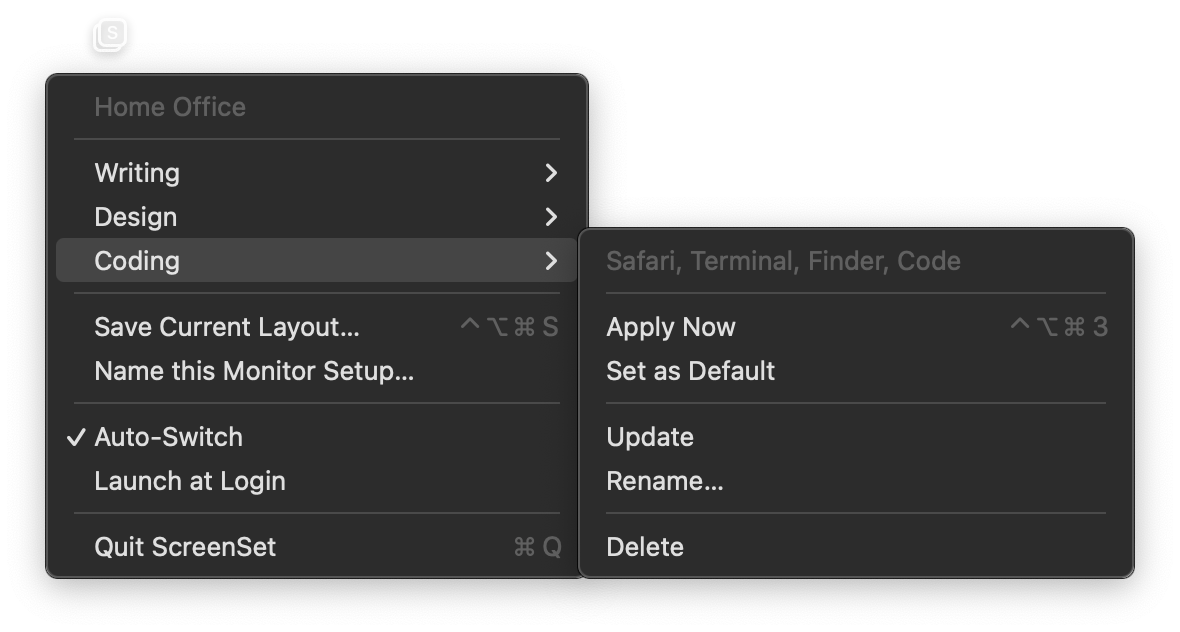
Arrange your windows the way you like, name it, and save. Coding, Writing, Design — whatever you run, ScreenSet keeps it.
Auto-Switch $14.99
ScreenSet remembers where your windows sit on each monitor setup, and snaps them back the moment your displays change — automatically, nothing to save.
Hotkey recall
Snap to any saved layout with ⌃⌥⌘ + a number. Save the current one with ⌃⌥⌘S. Never reach for the mouse.
Thirty seconds, no narration.
It restores the stack, not just the grid.
Most window tools put things back in the right rectangle. ScreenSet also restores which window sits on top of which — and it does it without stealing your focus.
Stacking order, preserved
Overlapping windows come back layered the way you had them. The app you were working in stays in front.
Resolution-independent
Positions are stored relative to your desktop, not as fixed pixels — so a layout still makes sense when the screen it was saved on isn't the screen it lands on.
Stays out of the way
A menu-bar app with no Dock icon, no window of its own, and no account to create. It does one job and then it's invisible.
Buy it once. That's the whole model.
No subscription, no account, no telemetry. Saving and recalling layouts is free forever — you only pay for the automatic part.
- Save unlimited named layouts
- Apply any layout from the menu
- Global hotkeys, ⌃⌥⌘ + 1–9
- Quick-save with ⌃⌥⌘S
- Launch at login
- Everything in the free version
- Auto-Switch — windows restore themselves the moment your displays change
- Automatic remembering, nothing to save
- Stacking order restored too
- No subscription, ever
Before you download.
Why does it need Accessibility permission?
Reading and moving windows on macOS is only possible through the Accessibility API, so every window manager needs this permission. ScreenSet uses it to read window positions and put them back. It doesn't read your screen contents, your keystrokes, or anything inside your apps.
Is there a subscription?
No. Premium is a one-time $14.99 purchase. The free version stays free with no time limit and no nagging.
What happens when the trial ends?
Auto-Switch quietly stops. Everything else — saving layouts, applying them, hotkeys — keeps working exactly as it did. Nothing is taken away and nothing is deleted.
Does it work with any app?
It works with apps that expose standard windows to macOS, which is nearly all of them. Full-screen and tiled windows are handled by macOS Spaces rather than by window position, so those aren't restored.
Why isn't it on the Mac App Store?
App Store apps must be sandboxed, and the sandbox blocks the Accessibility API that window management depends on. ScreenSet is distributed directly, signed with a Developer ID and notarized by Apple, so it opens without a Gatekeeper warning.
Does it send anything anywhere?
No analytics, no telemetry, no account. Layouts live in a local database on your Mac. The only network request ScreenSet ever makes is a single license check when you unlock Premium.
What Macs does it run on?
macOS 13 (Ventura) or later, on both Apple Silicon and Intel.
Stop dragging windows around.
Free to try for 14 days. No account, no card.